
There’s an easy way to change permissions via the Windows UI, but, for some reason, it wouldn’t let me change the owner of a number of files in bulk. I had to do it on a file by file basis, which is far from optimal. My assumption is that this was caused by the currently logged in user, who did not have administrator permissions.
What is the problem
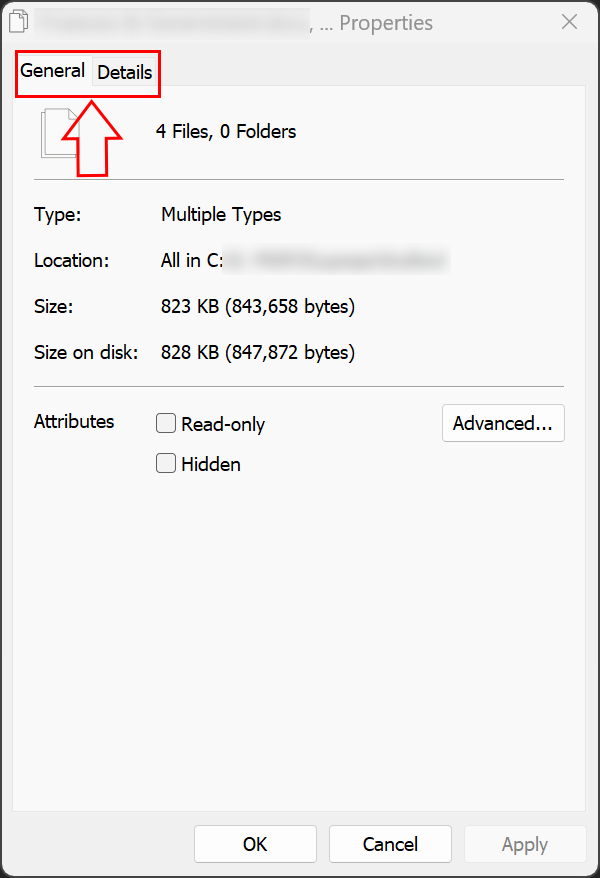
Normally, you’d select the file(s) you want to change the owner of, right click and then go to the “Security” tab of the Properties window. Unfortunately, this is not possible when the entire tab is missing:
What is the solution
We can easily take ownership or assign ownership to a different account via CMD.
- Open an elevated CMD (run as administrator)
- Navigate to the folder where the files are
- Use the takeown command if you want the administrator account to take ownership of the files or
- Use the icacls command to make a different account the owner of the files as follows:
icacls * /setowner “account name”
This will proceed to change the ownership of all the files in the folder: